add google

Thursday, 8 January 2015

How to Improve Your Home’s Wi-Fi Signal


Wi-Fi is just radio waves, and many things can cause interference. But a strong Wi-Fi signal can give you faster performance and better coverage distance, so it’s important to properly position and configure your router for optimal signal strength. I’ll show you how; it just takes a few minutes.

Point the Antenna Up

Routers generally have physical antennas that are adjustable. The antenna often comes pointed horizontally to fit the router inside its box. For maximum signal strength, position your router’s antenna vertically, pointing straight up. If you have two antennas, you won’t get better performance by pointing them in different directions.

Position Your Router Properly

Consider where you put your router. If you have a large home or office, place the router close to the center to maximize coverage. If you position the router at one end of the building, you may have poor (or no) signal at the other end.But keep in mind that if you already have your router positioned at one end of your home and the signal strength is just fine on the other side, you don’t need to move it.

For maximum coverage, the router should also be high up. Placing it on the floor is the worst location possible – place it on a high shelf, if possible.

Don’t place the router on or near large metal objects, such as metal shelves or filing cabinets. These can block the signal. Metal or stone walls can also block Wi-Fi, while wood and plaster walls won’t cause any problems.

You might be able to root out other sources of interference. For example: microwave ovens, 2.4 GHz cordless phones, and 2.4 GHz baby monitors all have the potential to interfere with a Wi-Fi signal. I’ve personally experienced a Wi-Fi signal to my laptop dying every time a microwave oven was turned on. The microwave oven was in direct line-of-sight between my laptop and the router. The solution? Move any one of them so that the microwave isn’t in between. If you get interference from a cordless phone, you might want to purchase newer 5.8 GHz cordless phones; these workon a frequency band other than Wi-Fi and don’t cause any interfere.


Choose the Best Wi-Fi Channel

If you’re in an area with many different Wi-Fi networks — such as an apartment complex or even just a house close to other homes — your neighbors’ Wi-Fi networks are probably interfering with yours.

To minimize this, move your router further away from the other Wi-Fi access points, if you can. For example, if you’re in an apartment and have a router in the corner of your room, your neighbor’s router might be right on the other side of the wall.

But the best thing you can do is switch to a different Wi-Fi channel. You access this option on your router’s settings page — check your router’s instruction manual for instructions on how to do that. (If you don’t have the instruction manual, you can almost certainly find the instructions online.) Locate the Wi-Fi channel option in the router’s web interface and change it to a different channel with less interference.

It might take a little experimentation to find the best one, but you can get help choosing a Wi-Fi channel using the Wi-Fi Analyzer app for Android phones and tablets, which will monitor the Wi-Fi networks near you and recommend the least-cluttered Wi-Fi channel for your network. Unfortunately, similar apps aren’t available for iPhone or iPad due to the limitations Apple places on app developers.

That’s it — all you really have to do is position your router well and choose the ideal Wi-Fi channel to optimize your network. Of course, buying a new router that supports modern, improved Wi-Fi standards may also offer you a signal strength and speed boost.

Thursday, 1 January 2015

Amazon Offers 33 Paid Android Apps Worth $110 for Free


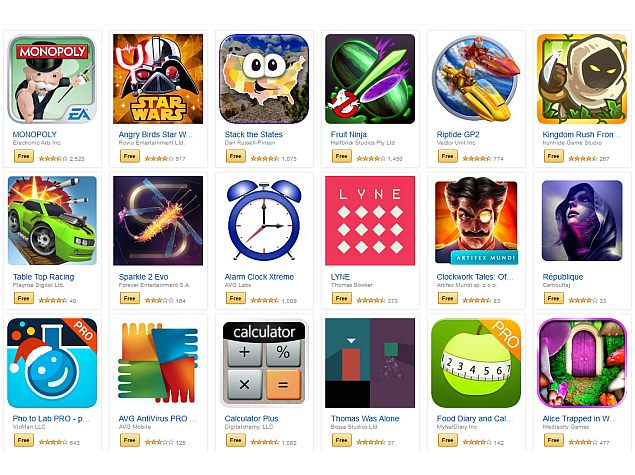
With the start of new year 2015, Amazon Appstore now has 33 paid Android apps worth $110 (approximately Rs. 7,000) available to download for free until Friday.
The 33 paid apps, which include a mix of games and utilities, will be free for all Android users via Amazon Appstore from December 31 to January 2.

The gaming apps on offer include some big titles like Angry Birds Star Wars II, Fruit Ninja, Kingdom Rush Frontiers, Monopoly, Riptide GP2, and more. Some of the utility apps include AVG AntiVirus PRO Android Security, LYNE, JEFIT Pro, and Pho.to Lab PRO.

Additionally, Amazon has slashed the prices of a number of apps like Monsters Ate My Birthday Cake, which is down from $4.99 to 99 cents, and games like Final Fantasy IV from $15.99 to $6.99.

If you don't have Amazon Appstore installed, you can get it from the Amazon website.

Here's the full list:

Angry Birds Star Wars II
Alarm Clock Xtreme
Alice Trapped in Wonderland
AVG AntiVirus PRO Android Security
Azkend 2: The World Beneath
Bills Reminder
BuildCalc
Buttons and Scissors (Pro)
Calculator Plus
Clockwork Tales: Of Glas
Deep Sleep with Andrew Johnson
Distant Suns: Unleash your inner astronaut
Fruit Ninja
Food Diary and Calorie Tracker PRO by MyNetDiary
Garfield's Escape
JEFIT Pro
Kingdom Rush Frontiers
LYNE
Monopoly
Mini Piano
Might and Magic Clash of Heros
Orrery
Pho.to Lab PRO
Patchworkz (Full)
Riptide GP2
Republique
Sparkle 2 Evo
Stack the States
Table Top Racing
Townsmen Premium
Thomas Was Alone
Uncanny X-Men: Days
Xtralogic Remote Desktop Client


Xiaomi Working on an Internet-Connected Water Purifier

WorldTechzone.Com


Popular smartphone-maker Xiaomi, which recently launched an Internet-connected air purifier, is now reportedly planning a water purifier on the same lines.
GGV Capital, an early investor in the Chinese company, says Xiaomi has shown a prototype of the new water purifier to its investors, Bloomberg reported on Tuesday.

"They have a product pipeline," Jenny Lee, Managing Partner at GGV Capital, told Bloomberg in a telephonic interview. "Going forward it's not just going to be the Xiaomi phone or the TV. The upside and the investment around Xiaomi is the hope they can get into the smart home."

Last month, the company made a move in the Internet of Things (IoT) sphere with the launch of Internet-connected Mi Air Purifier. The purifier was designed by a company called Zhimi, which Lei revealed was one of the 25 startups in which Xiaomi has invested.

Priced at CNY 899 (approximately Rs. 899), the Mi Air Purifier can connect to the user's smartphone and alert them if the filter has reached end-of-life and needs to be replaced. Xiaomi says that the air purifier can produce up to 406 cubic meters (14,000 cubic feet) of clean air per hour and sends pollution readings to connected smartphones.

As the report notes, the Chinese electronics company also recently started selling a light bulb designed by another startup called Yeelight. The colour of the light that the bulb emits can be changed by a remote.

"The smart home is a much bigger market," Lee said. "Homes are getting connected with phones, tablets and TVs in ways that are highly synergistic. Xiaomi definitely wants to be part of that. That is their key strategy."

Top 10 Tech Companies to Work for in New Year 2015

http://www.exploretalent.com/articles/wp-content/uploads/2014/12/sarvissolutions.jpg
Worldtechzone.Com


Google has topped popular career community Glassdoor's list of 50 best companies to work for in new year 2015.
Glassdoor, which collects feedback from company employees to compile the annual Employees' Choice Awards for best places to work across the US and the UK, has recognised Google as the number one company to work for in new year 2015.

Facebook, Qualcomm, Adobe, Apple, and LinkedIn are the famous names in the list of top 10 tech companies to work in new year 2015.

The social networking giant Facebook is the third-most preferred tech employer (behind Google and F5 Networks), while Qualcomm and Adobe take the next two places in the list. Micro-blogging site Twitter, which was the second best company overall and the number one tech company last year, has fallen off the grid and is even out from the list of top 50 companies to work across the US and the UK.

"It is probably the single biggest change and surprise this year that Twitter did not make the list at all," Robert Hohman, Co-Founder and CEO of Glassdoor, told CNBC.

It's worth pointing out that Glassdoor only ranks US and UK-based companies with at least 1000 employees as part of its annual list.

Apple is the seventh-most favoured tech employer on the list for new year 2015 behind MathWorks and others mentioned above, with LinkedIn, Zillow, and Mindbody rounding off the list.

Here are the top 10 tech companies to work for in new year 2015:

1. Google (overall #1)

2. F5 Networks (overall #4)

3. Facebook (overall #13)

4. Qualcomm (overall #14)

5. Adobe (overall #18)

6. MathWorks (overall #19)

7. Apple (overall #22)

8. LinkedIn (overall #23)

9. Zillow (overall #33)

10. Mindbody (overall #34)

Friday, 26 December 2014

Rumor Roundup: HTC One M9, 12-Inch Retina MacBook Air and Smaller iPhones

HTC logo
Worldtechzone.Com


Mark L is back to tackle the biggest tech rumors of this week! On this week’s episode of Rumor Roundup, Mark talks about HTC readying its next flagship, the HTC One M9, with impressive specs like a Snapdragon 810 processor and a whopping 3GB of RAM and Apple finally releasing the long awaited 12-inch Retina MacBook Air.
Mark also talks about Apple rethinking its phone strategy by releasing a diminutive 4-inch iPhone alongside it’s traditional “s” iPhone updates. All this and more in this episode of Rumor Roundup!

Thursday, 25 December 2014

Ban lifted, OnePlus can sell the One in India once again


Have you ever heard the theory of winning a battle, but losing the war? A judge in India has lifted the sales ban on OnePlus One Android smartphones in India, but is it enough to ‘win the war?’
OnePlus experienced a major let down a short while ago when an agreement between Cyanogen and Micromax led to the ban of sales of the OnePlus One in India. Today’s decision does not fully overcome the problems for the OnePlus team and its customers, instead, we are seeing a temporary lift of the sales ban, and nothing more.
The decision to lift the ban comes from the opinion that fellow smartphone manufacturer Micromax, with its ‘exclusive right to use Cyanogen’s custom Android software’ within India, is not actually in competition with OnePlus in the market. Micromax primarily produces phones for the low end market, where OnePlus has been deemed to target the high end market.

What comes next, you ask? Well, everything will be kicked back to the original judge in a couple weeks, giving all parties some time to look over the situation. We have no idea as yet how things will go when it all lands back in court, where OnePlus will, again, need to try to convince the judge to let them continue sales in the country.
In terms of the ‘war,’ many will see this victory as too little to make a difference. OnePlus can sell the One in India now, however, even if the decision goes their way in a couple weeks, owners of the One will still not be receiving updates to their system – a continuation of the Micromax agreement, check out our initial coverage for more details.
These are tough times for OnePlus in India, do you think this victory will start the ball rolling for success in the country?

Microsoft Dedicates New Site to People Switching From Mac to Windows

http://shop.zaubzer.de/images/product_images/original_images/art_apple_macbook-pro-1.jpg


Microsoft has taken repeated shots at Apple’s MacBook lineup, and the Redmond company is taking its efforts even further with a dedicated site for those making the switch away from Cupertino. It’s unclear how successful Microsoft’s cause has been thus far, but it’s not hard to find an ad that takes issue with Apple’s famous laptop family. There’s been one ad in particular that is almost impossible to avoid, and Microsoft’s not stopping there.
The page setup by Microsoft isn’t actually meant for straight up comparisons. Instead, it assumes you’ve purchased (or plan to purchase) a Surface Pro 3 or Windows computer, and details what the process will be like making the switch over from OS X.
“We know moving these memories from one platform to another can be nerve-racking and learning new software can seem daunting,” the site explains. “We want to make the transition as easy as possible. If you currently have a Mac and have questions about switching to Surface Pro 3 and Windows, we designed this site to help get you started.”
Several links are then provided by Microsoft, including getting started with Windows, how to move stuff from a Mac to a Surface Pro 3, and using a Surface Pro 3 with an iPhone, iCloud and iTunes. It’s pretty much all the information you’ll ever need without needing to go directly into a Microsoft dedicated store. Follow Microsoft’s instructions, and the switch should be as painless as possible.
The timing is perfect with Christmas this week. If you just got a Surface Pro 3, or plan on making the switch from your MacBook Air in the near future, Microsoft’s new page is just for you.